Smart locks / Schlage
Schlage Encode Plus (BE499)
A Wi-Fi deadbolt with Apple Wallet tapping and app access for iPhone and Android.
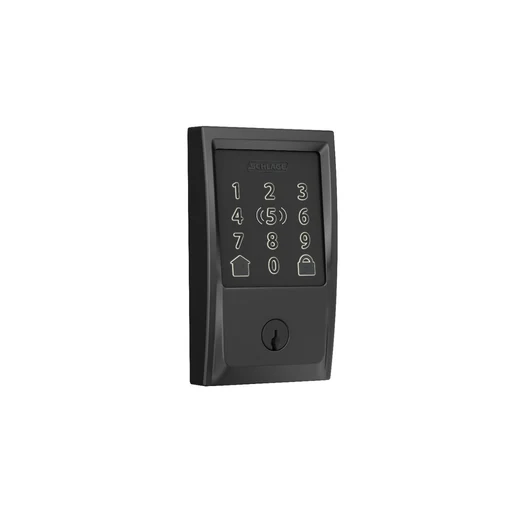
Photo: Schlage
Model and local version
US Schlage Encode Plus BE499 model researched.
Connections: Wi-Fi, Bluetooth, NFC
What it can do
Shared setup
- Use the phone app.For Schlage Home local app operation; Schlage Home remote operation.
- US model.For Schlage Home local app operation; Schlage Home remote operation; Apple Wallet NFC tap; Apple home-key family sharing; Apple Home remote control and automations; Guest access codes; Scheduled guest codes.
- iPhone or Android phone.For Schlage Home local app operation; Schlage Home remote operation.
- Compatible iPhone or Apple Watch.For Apple Wallet NFC tap; Apple home-key family sharing.
- iOS 15 or later.For Apple Wallet NFC tap; Apple home-key family sharing.
- watchOS 8 or later.For Apple Wallet NFC tap; Apple home-key family sharing.
- A compatible Apple Home hub is required.For Apple home-key family sharing; Apple Home remote control and automations.
Features and the setup they need.
| Feature & setup | Confirmation & sources |
|---|---|
Schlage Home local app operationDevice feature Lock and unlock nearby using Schlage Home on iPhone or Android over Bluetooth. How to use it
| ✓ Confirmed Schlage · 2026-10-25
|
Schlage Home remote operationDevice feature Lock, unlock and manage access remotely through the lock's Wi-Fi connection. What you’ll need
How to use it
| ✓ Confirmed Schlage · 2026-10-25
|
Apple Wallet NFC tapApple Home Tap an eligible iPhone or Apple Watch to unlock. One person's home key works without an Apple Home hub. How to use it
| ✓ Confirmed Schlage · 2026-10-25
|
Apple home-key family sharingApple Home Share Apple home keys with household members using an Apple Home hub. How to use it
| ✓ Confirmed Schlage · 2026-10-25
|
Apple Home remote control and automationsApple Home Control the lock remotely and run Apple Home automations with an Apple Home hub. What you’ll need
| ✓ Confirmed Schlage · 2026-10-25
|
Guest access codesDevice feature Create and delete guest keypad codes in Schlage Home. How to use it
| ✓ Confirmed Schlage · 2026-10-25 |
Scheduled guest codesDevice feature Schedule codes for recurring visits or a fixed date range in Schlage Home. What you’ll need
How to use it
| ✓ Confirmed Schlage · 2026-10-25
|
Other integrations and limits (2)
| Feature & setup | Confirmation & sources |
|---|---|
Samsung Wallet NFC tapSmartThings Samsung Wallet home-key support is not established for BE499 by this research. Schlage brand participation in Aliro is insufficient evidence. | ? Not confirmed No separate source is recorded for this feature. |
UWB hands-freeApple Home Apple NFC support does not establish hands-free UWB support on Encode Plus. The comparison page covers multiple Schlage models. | ? Not confirmed No separate source is recorded for this feature. |
Where we checked
- Schlage Encode Plus Smart WiFi Deadbolt ↗Schlage · checked 2026-10-25
Feature documentation
- Encode Plus: Pairing with Apple HomeKit and the Schlage Home App ↗Schlage · checked 2026-10-25
Feature documentation
Distinguishes one-phone tap access from shared tap access requiring an Apple Home hub.
- Do Schlage Encode Series Locks Require Wi-Fi? ↗Schlage · checked 2026-10-25
Feature documentation
Local app pairing can use Bluetooth; online features are distinct.
- Will the Schlage Encode Series Connect to the Eero Router? ↗Schlage · checked 2026-10-25
Feature documentation
- Tap to unlock with Apple home keys ↗Schlage · checked 2026-10-25
Feature documentation
Launch-era minima iOS15/watchOS8. Follow current Apple setup guidance; no iPad is offered as a current home hub in this catalogue.
- Regional catalogue, model or offering evidence ↗schlage.com.au · checked 2026-10-26
Australia: exact local listing unconfirmed
- Regional catalogue, model or offering evidence ↗schlage.com · checked 2026-10-26
Listed in United States
- Regional catalogue, model or offering evidence ↗schlage.ca · checked 2026-10-26
Listed in Canada
Features are based on the linked manufacturer documentation. Household results also check the equipment and software you select. How we check.